
Commercial Hand Dryer Troubleshooting Guide: 6 Common Problems, Expert Fixes & Preventive Maintenance
Posted by Tahnee Talley on Jul 16th 2026
Diagnose Common Hand Dryer Problems Before Calling for Service
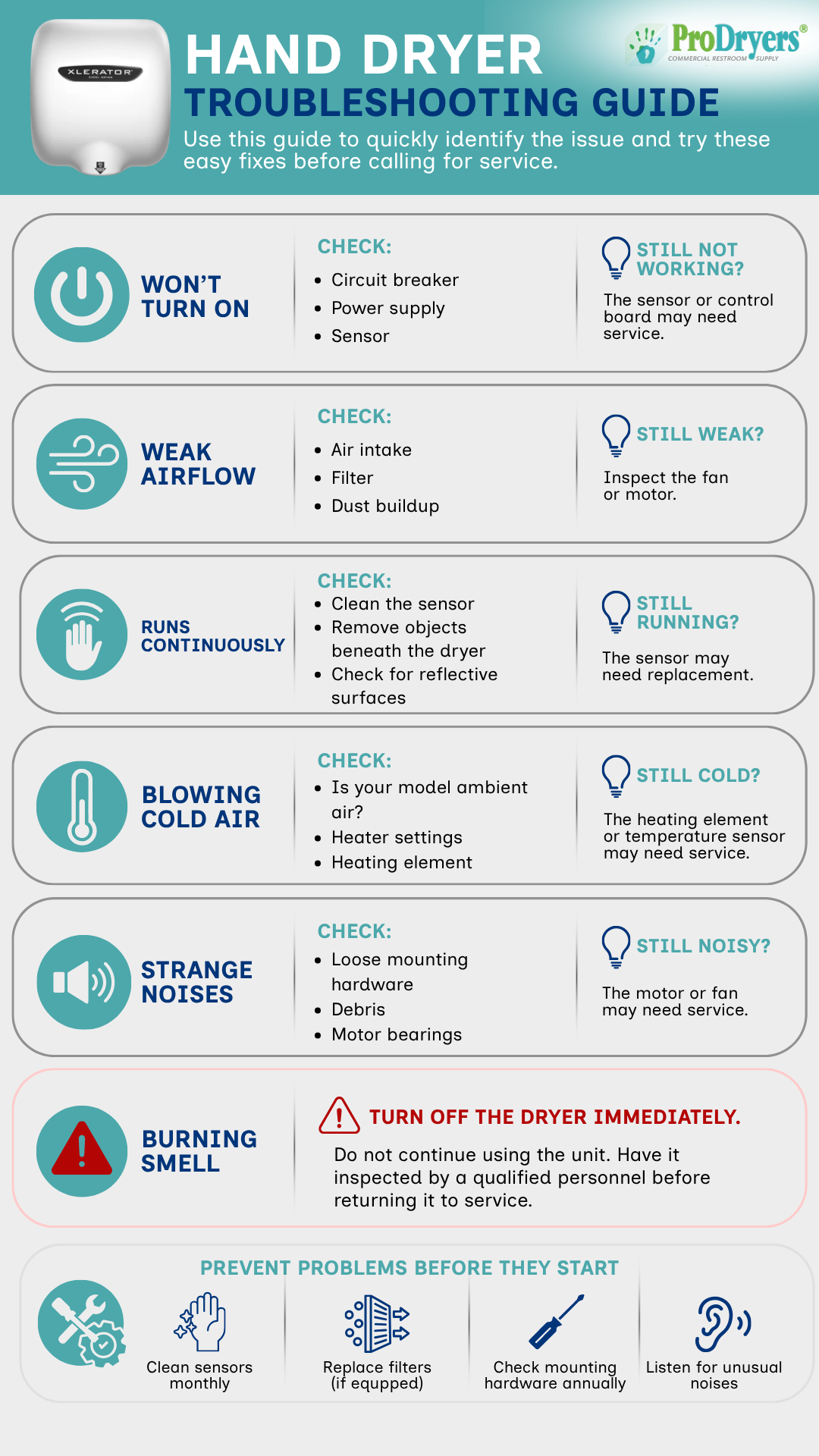
Hand Dryer Troubleshooting Quick Reference
| Problem | Most Likely Causes | First Step |
|---|---|---|
| Dryer will not turn on | Power interruption, dirty sensor or control problem | Check power and clean the sensor |
| Weak airflow | Blocked intake, dirty filter, dust or lint buildup | Clean the air intake |
| Runs continuously | Dirty sensor, nearby object or reflective surface | Clean and inspect the sensor area |
| Blows cold air | Ambient-air design, disabled heat setting or heater issue | Confirm whether the model uses heated air |
| Makes unusual noises | Loose mounting hardware, debris, fan or motor wear | Inspect mounting and intake areas |
| Produces a burning smell | Electrical or mechanical failure | Turn off power immediately |
Before You Start Troubleshooting
A little preparation can save time and prevent unnecessary parts from being ordered. Before beginning, write down the manufacturer, model number, approximate age of the dryer and exactly what happens when someone places their hands beneath it.
Note whether the dryer makes a sound, whether the motor starts, whether air comes out, whether it shuts off normally and whether the circuit breaker has tripped. These details are much more helpful to a service technician than simply reporting that the dryer does not work.
1. Hand Dryer Will Not Turn On
If the dryer does not activate when a user places their hands beneath it, do not assume that the entire unit has failed. Power and sensor problems are far more common than complete motor failure.
Check These First
Check the circuit breaker. Confirm that the breaker serving the restroom has not tripped. If it trips again after being reset, stop and have the circuit inspected.
Confirm the dryer is receiving power. A loose connection, switched-off disconnect or failed power supply can prevent activation.
Clean the sensor window. Soap residue, water spots, dust and fingerprints can interfere with an automatic sensor. Use a soft cloth and a cleaner that will not damage the sensor lens.
Check the hand position. Some dryers have a narrower activation zone than others. Move your hands slowly beneath the sensor to see whether the unit activates in a particular area.
Inspect visible wiring only if qualified. Loose or damaged wiring should be handled by trained maintenance or electrical personnel.
Still not working? If power is reaching the dryer and the sensor area is clean, the sensor module, control board, motor or internal power supply may require testing. This is the point where the model number becomes important because replacement parts are specific to the manufacturer and dryer series.
2. Weak or Reduced Airflow
A dryer that still runs but produces less air than it used to usually has a restricted intake or airflow path. This is often a maintenance problem rather than a failed motor.
Check These First
Clean the air intake. Dust, paper fibers and lint can collect around intake openings, especially in busy public restrooms.
Inspect the filter. Some modern hand dryers use washable, replaceable or HEPA filters. A clogged filter can reduce airflow and place additional strain on the motor.
Look for obstructions. Make sure the air outlet and intake have not been blocked by debris, tape, restroom supplies or a wall accessory installed too close to the dryer.
Listen to the motor. A noticeable change in motor speed or pitch may indicate wear rather than a simple airflow restriction.
Still weak? If the intake and filter are clean, the fan, motor or internal airflow path may need inspection. Continuing to run a dryer with a struggling motor may eventually lead to a complete failure.
3. Hand Dryer Runs Continuously
A hand dryer that keeps running after the user steps away is usually receiving a false sensor signal. The dryer may be detecting an object, a reflection or buildup on the sensor window.
Check These First
Clean the sensor. Water spots, soap residue and dust can cause erratic activation.
Remove objects beneath the dryer. Wastebaskets, countertop items, signs and dispensers can enter the sensor range.
Look for reflective surfaces. Mirrors, polished stainless steel, glossy tile and other reflective materials can sometimes trigger an infrared sensor continuously.
Check for recent restroom changes. If the problem began after a mirror, backsplash, partition or dispenser was installed, the new item may be interfering with the sensor.
Review the sensor range. Certain hand dryers allow sensor sensitivity or activation distance to be adjusted. Follow the manufacturer’s instructions for the exact model.
Still running? Disconnect power and have the sensor or control module inspected. A dryer should not be left running continuously because it increases wear and may cause the unit to overheat.
4. Hand Dryer Is Blowing Cold Air
Cold air does not automatically mean the dryer is broken. Many newer high-speed hand dryers use fast-moving ambient air instead of relying heavily on heat. This reduces energy consumption and can still provide a quick drying time.
Check These First
Confirm how the model was designed. Look up the model specifications or installation manual to determine whether the dryer includes a heating element.
Check adjustable heat settings. Some dryers allow heat to be enabled, disabled or reduced to control energy use.
Consider the restroom temperature. Ambient-air dryers will naturally feel colder in an unheated restroom or during winter.
Inspect the heating system. If the dryer normally produces warm air and suddenly does not, the heating element, thermal protection device or temperature sensor may need service.
Important: A modern dryer can feel cool while still working properly. Drying performance should be judged by air speed and drying time, not heat alone.
5. Strange Noises, Rattling or Vibration
Grinding, rattling, scraping or increased vibration can point to loose mounting hardware, debris in the fan area or wear inside the motor assembly. Do not ignore a new sound, especially if it becomes louder over time.
Check These First
Inspect the mounting hardware. A dryer that has loosened from the wall can vibrate even when the motor is operating normally.
Look for debris around the intake. Small pieces of paper, dust or other material may create noise when air passes through the dryer.
Check the cover. A cover that is not seated correctly can rattle against the base or wall.
Listen for bearing wear. Grinding, squealing or metallic sounds can indicate worn motor bearings or contact inside the fan assembly.
Still noisy? Turn off the dryer and have the motor and fan assembly inspected. Continued use can turn a repairable fan or bearing problem into a more expensive motor failure.
6. Burning Smell or Excessive Heat
A burning odor should always be treated as a possible electrical or mechanical problem. This is not an issue to monitor while continuing to use the dryer.
Turn Off the Dryer Immediately
Shut off electrical power to the unit.
Do not continue operating the dryer to see whether the smell goes away.
Keep the dryer out of service until it has been inspected by qualified maintenance or electrical personnel.
Replace damaged wiring, components or insulation only with parts approved for the specific model.
A burning smell may come from overheated wiring, a stalled motor, damaged insulation, accumulated debris or a failing electrical component. Water entry, repeated breaker trips, visible sparks or a cover that becomes unusually hot are also reasons to stop using the dryer immediately.
How Difficult Is the Repair?
| Task | Typical Difficulty | Who Should Handle It? |
|---|---|---|
| Clean the sensor or exterior | Easy | Routine maintenance staff |
| Clean the intake or replace an accessible filter | Easy | Routine maintenance staff |
| Tighten mounting hardware | Easy to moderate | Facility maintenance staff |
| Adjust or replace a sensor | Moderate | Qualified service personnel |
| Replace a control board or heating element | Advanced | Qualified electrical or service personnel |
| Replace a motor or fan assembly | Advanced | Qualified service personnel |
Where to Find the Model Number
You will usually need the exact model number before ordering a sensor, motor, control board, filter or other replacement component. Two dryers that look similar from the outside may use completely different internal parts.
The model number may be located on a label along the side or bottom of the dryer.
It may be printed inside the cover or on the internal base plate.
It may appear near the electrical rating information.
It may also be listed on the original invoice, product manual or maintenance records.
Take a clear photograph of the entire label. Voltage, serial number and manufacturing information may also be needed when contacting the manufacturer or looking for commercial hand dryer replacement parts.
Brand-Specific Troubleshooting Considerations
The basic troubleshooting process is similar across most commercial dryers, but filters, heat controls, sensor adjustments and internal components vary by manufacturer and model.
XLERATOR Hand Dryers
Some XLERATOR hand dryers include adjustable speed, sound, heat or sensor settings depending on the model and generation. Before assuming that a heater or motor has failed, verify how the unit was configured. Exact model information is especially important when ordering controls, heating elements or motor components.
Dyson Airblade Hand Dryers
Dyson Airblade hand dryers may use filters and multiple sensors depending on the model. Cleaning the activation area and following the recommended filter maintenance schedule are important first steps when airflow or activation changes.
World Dryer Hand Dryers
World Dryer hand dryers include traditional heated models as well as newer high-speed designs. A unit that blows cooler air may be operating normally, depending on the product series and selected heat setting.
The same principle applies to hand dryers made by American Dryer, Bobrick, ASI, Sloan, Saniflow, Airdri, Palmer Fixture and other manufacturers. Always use the instructions and approved components for the exact model being serviced.
Check the Warranty Before Ordering Parts
Before paying for a motor, sensor or control board, determine whether the dryer may still be covered by the manufacturer’s warranty. Warranty length and coverage vary by manufacturer, model, component and purchase date.
Have the model number, serial number, purchase date and a clear description of the problem ready. Photographs or a short video can also help document an intermittent sensor issue, unusual sound or startup problem.
Do not assume that opening or modifying the dryer will have no effect on warranty coverage. Review the manufacturer’s instructions before performing internal repairs.
Prevent Problems Before They Start
Preventive maintenance is usually easier and less expensive than responding to an unexpected failure. The right schedule depends on restroom traffic, environmental conditions and the dryer model.
| Frequency | Recommended Maintenance |
|---|---|
| Monthly | Clean the sensor window, wipe the housing and verify normal activation and shutoff. |
| Quarterly | Inspect air intake openings, remove dust and debris, and clean accessible intake screens. |
| Every 6 Months | Inspect filters where equipped and increase service frequency in high-traffic or dusty locations. |
| Annually | Check mounting hardware, inspect overall condition and listen for changes in sound or vibration. |
| As Recommended | Replace filters and other service items according to the manufacturer’s instructions. |
Should You Repair or Replace the Hand Dryer?
A simple sensor cleaning or filter replacement is an easy decision. Repeated electrical failures or an obsolete motor require a closer look at the cost of continued repairs.
| Condition | What to Consider |
|---|---|
| The dryer only needs cleaning or an inexpensive service part | Repair is usually the practical choice. |
| The dryer is relatively new and parts are readily available | Check warranty coverage and repair options first. |
| The motor or control board has failed repeatedly | Replacement may provide better long-term value. |
| Replacement parts have been discontinued | A new dryer is often the most practical solution. |
| The dryer is slow, inefficient or poorly suited to restroom traffic | Compare repair cost with the benefits of a faster modern unit. |
| The housing, wiring and several internal components are damaged | Full replacement is usually safer and more economical. |
Modern commercial hand dryers may offer faster drying, lower energy use, adjustable settings, quieter operation and improved filtration. Those benefits can make replacement worthwhile when an older dryer requires a major repair.
Product selection matters too. Our guide to what facility managers get wrong about hand dryers explains why traffic level, electrical requirements, placement and maintenance expectations should all be considered before choosing a replacement.
What to Have Ready Before Calling Technical Support
Manufacturer and exact model number
Serial number, if available
Voltage shown on the product label
Approximate purchase or installation date
A detailed description of the problem
What has already been cleaned, adjusted or tested
Photographs of the dryer and product label
A short video if the problem involves sound, vibration or intermittent activation
Frequently Asked Questions
Why will my hand dryer not turn on?
Start by checking the circuit breaker, confirming that the dryer is receiving power and cleaning the sensor window. If power is present and the sensor is clean, the sensor, control board, motor or internal power supply may need service.
Why does my hand dryer only work sometimes?
Intermittent operation can be caused by a dirty sensor, loose connection, inconsistent hand placement, sensor range problem or failing electrical component. Record exactly when the problem occurs before contacting technical support.
Why is the airflow from my hand dryer weak?
Weak airflow is commonly caused by a blocked air intake, dirty filter, dust buildup or debris. If cleaning does not restore airflow, the fan or motor may require inspection.
Why will my hand dryer not stop running?
A dirty sensor, an object beneath the dryer or a nearby reflective surface may be continuously triggering the sensor. Clean the sensor and inspect the surrounding area before adjusting or replacing components.
Is it normal for a hand dryer to blow cold air?
Yes. Many high-speed hand dryers use ambient air to reduce energy consumption. If the model normally produces heated air and has suddenly become cold, check the heat setting or have the heating system inspected.
Why is my hand dryer louder than it used to be?
A new rattling, grinding or squealing sound may come from loose mounting hardware, a cover that is not seated correctly, debris, worn motor bearings or a damaged fan assembly.
Why does my hand dryer trip the circuit breaker?
Repeated breaker trips can indicate an electrical fault, damaged wiring, an overloaded circuit or a failing internal component. Stop using the dryer and have the circuit and unit inspected by qualified personnel.
How often should a commercial hand dryer be maintained?
Clean the sensor and exterior monthly, inspect air intakes quarterly and perform a full condition and mounting inspection at least once per year. High-traffic or dusty restrooms may require more frequent maintenance.
How long should a commercial hand dryer last?
Service life depends on product quality, restroom traffic, maintenance, installation and operating conditions. A well-maintained commercial dryer can remain in service for many years, but repeated major failures may make replacement more practical.
Should I repair or replace an older hand dryer?
Repair usually makes sense when the dryer needs a readily available sensor, filter or other modest service part. Replacement may be better when the motor or control system fails repeatedly, parts are discontinued or the unit is inefficient and no longer meets the facility’s needs.
Need Help Troubleshooting a Commercial Hand Dryer?
The ProDryers team can help you identify a dryer, locate compatible replacement parts or compare new models when repair is no longer the best option.
Shop Replacement Parts Shop Commercial Hand DryersMeet the ProDryers Team
Tahnee Talley
Commercial Product Specialist at ProDryers
Tahnee works with facility managers, schools, healthcare organizations, contractors and maintenance professionals who need help identifying products, locating replacement parts and resolving commercial hand dryer issues.
Her practical product knowledge helps customers move beyond a generic description of the problem and identify the information needed to make a sound repair or replacement decision. Visit our meet the team page to learn more.